

Changelog
Stay up to date with the latest features, improvements, and fixes.
RELEASE: 05 OCT 2026
1) Multiple reminders for custom and AI surveys
Managers can now schedule one reminder per five working days of a survey’s duration, so a month-long survey can have four reminders instead of one. A reminder can be sent no earlier than 24 hours after activation and no later than the day before the survey expires. Using “Send now” consumes the current reminder slot.
2) Intent to Leave filter on the Employees page
Lists employees whose latest answer to the intent-to-leave question was unfavorable.
3) Color legend in the Employee Engagement report
The Employee metrics and engagement category pages now explain what each answer color means.
4) Selected item count in filters
Pages that let you pick employees or teams now show how many items are selected.
[Fix] Team report export
Exports no longer fail on large team hierarchies and long periods.
RELEASE: 15 SEP 2026
1) Individual Manager permissions
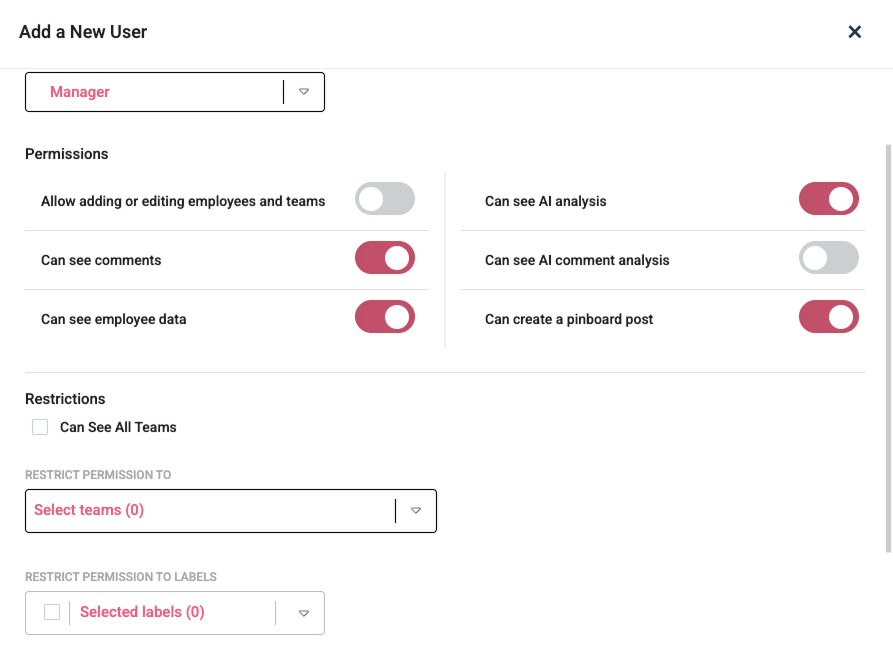
You can customize permissions for each individual manager while you’re adding them, or later.
2) Find employees by language
Employees page (User management) now has a filter for active languages, visible also when the page is exported.
Team report export
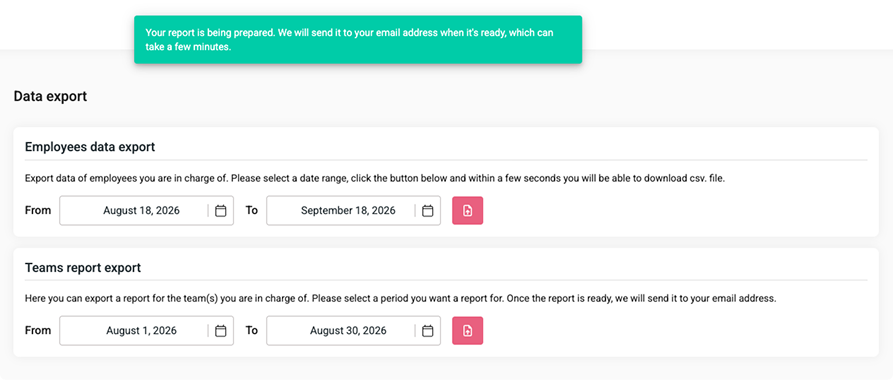
Data export page now includes the Team report export. When started, the report is generated in the background and automatically sent to the email address of the person who started the export.
RELEASE: 01 SEP 2026
Custom “Thank you” message after survey completion
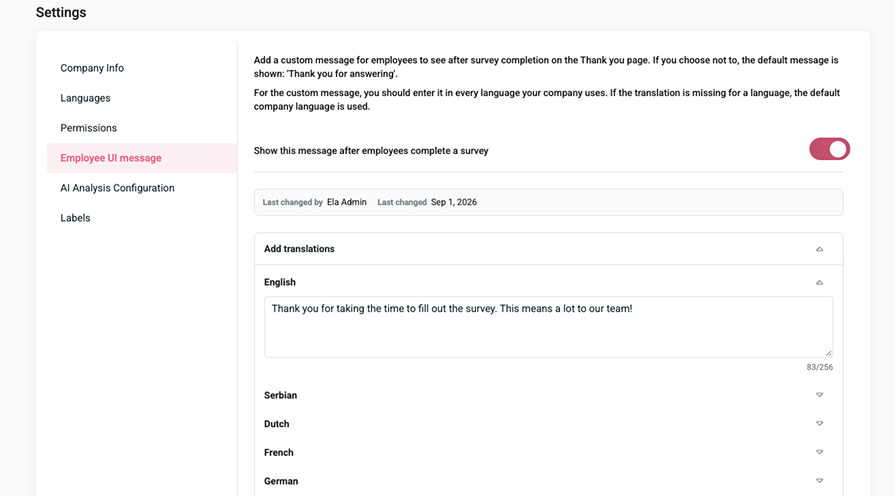
You can write a custom message to be shown after survey completion. The message should be added in every active company language and will be shown only if the toggle is enabled.
RELEASE: 26 AUG 2026
1) Analytics page
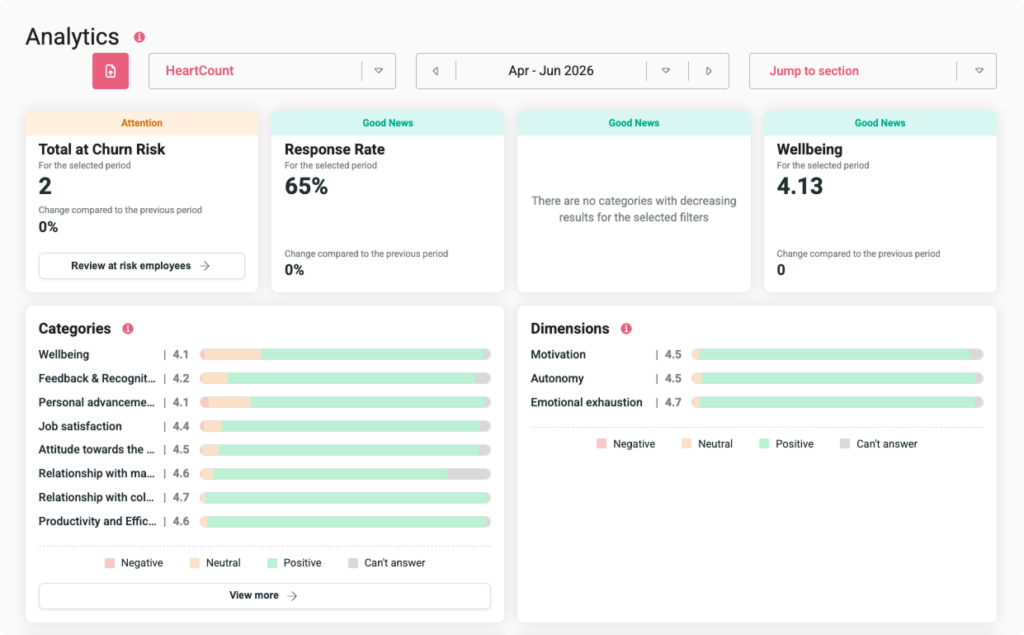
A new page providing a comprehensive view of everything important in HeartCount, with an adapted view for different roles & permissions. Quickly scan through response rates, wellbeing, churn risk, kudos, comments, eNPS, and more signals to get the full picture. Read more.
2) New Employee tips
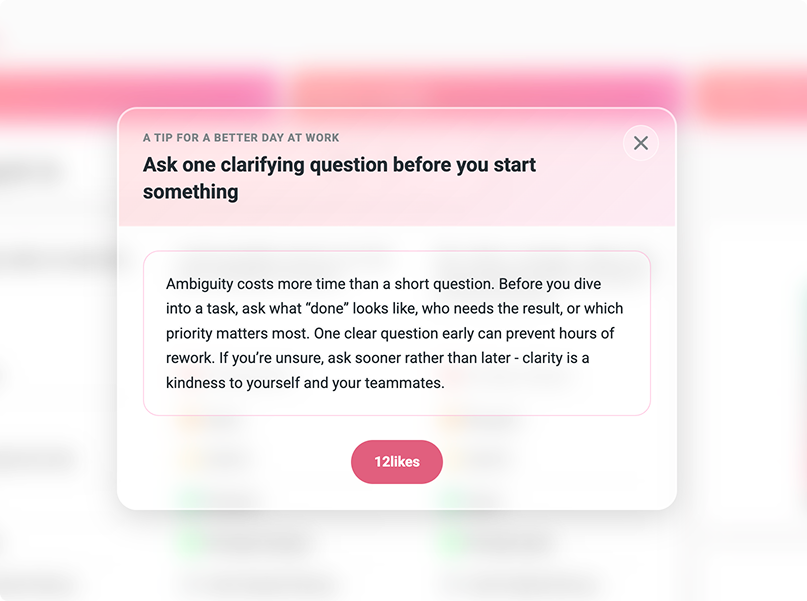
Added 8 new employee tips for a better day at work.
3) Bulk actions in Team management
Added functionality to bulk import or bulk deactivate team members.
4) SCIM Integration enabled
Delete custom questions
Enabled custom question deletion on the ‘Question’ page. Available only when the custom question was not already used in Pulse Check and is not in the future schedule.
RELEASE: 04 AUG 2026
1) AI Analysis & Export on the Communications page
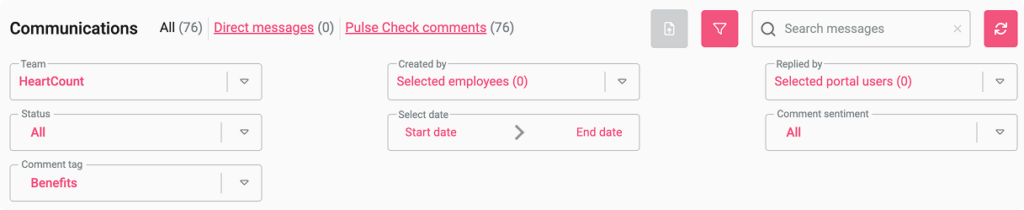
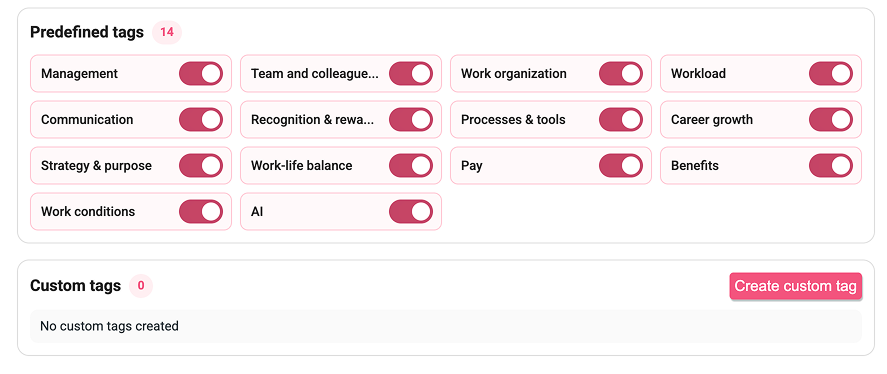
New filters for comment sentiment and comment tags on the Communications page for companies that use the AI Impact Module.
Now you can specifically search for comments with positive, neutral, negative, or mixed sentiment. You can also search for comments that AI recognized as relevant for a wide range of topics, defined through tags. Read more
The Communication page can now also be exported with a custom data set through filtering.
1) Team hierarchy change
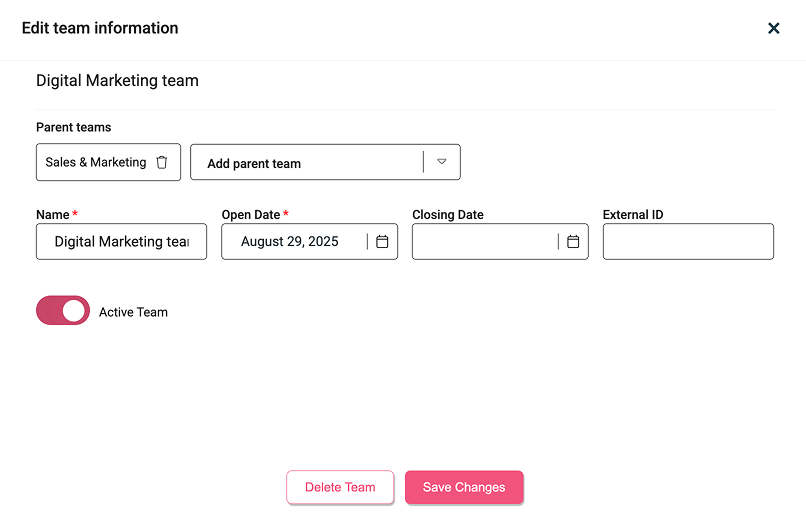
Subteams can have multiple parent teams.
2) Column changes in Teams Overview

Added columns for High Churn Risk, Kudos, eNPS, and Intent to Leave (shown if the question measuring it has been sent in the selected period). Removed highly negative, previously highly negative, and praises. This view is reflected in the export, too.
3) Optional Teams filter on Kudos

Added a manager toggle in Settings for companies to choose if they want to allow employees to see the teams filter on the Kudos feed page or not.
RELEASE: 09 JUL 2026
1) AI Impact Module - Survey Summary
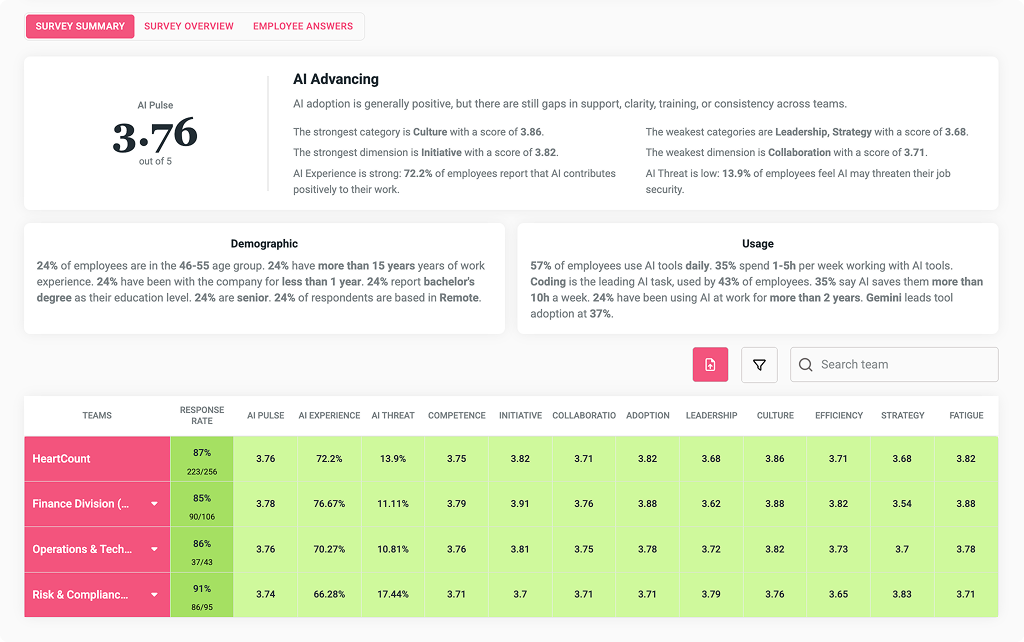
A new Summary page has been added to the AI Impact Module report, where you can see the overall current state of the AI impact in your team: AI Pulse, your strongest and weakest categories and dimensions, metric scores, and a summary of usage and demographic statistics. This page can be exported as an Excel file.
2) 100 new Kudos Cards & Kudos Analytics
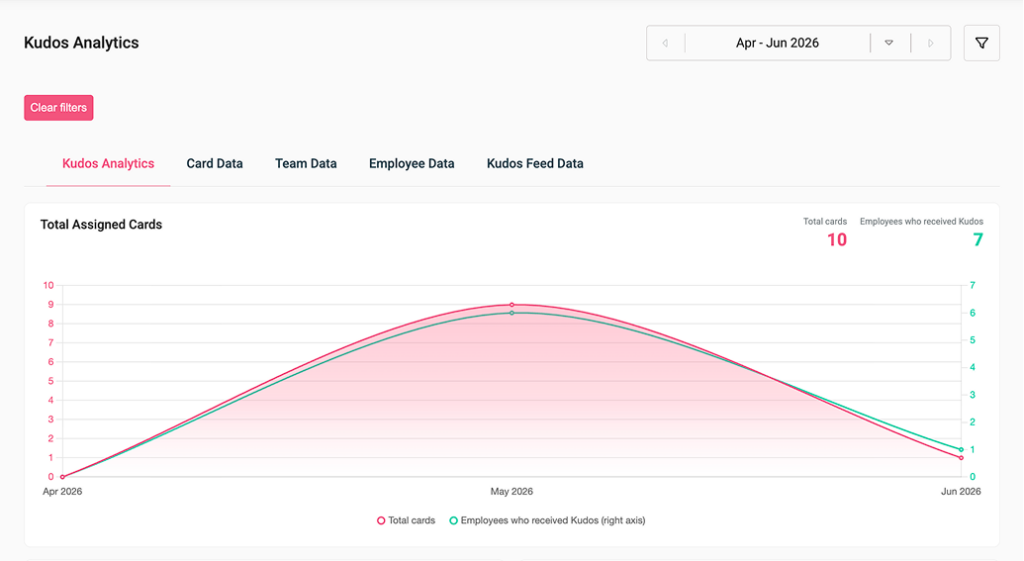
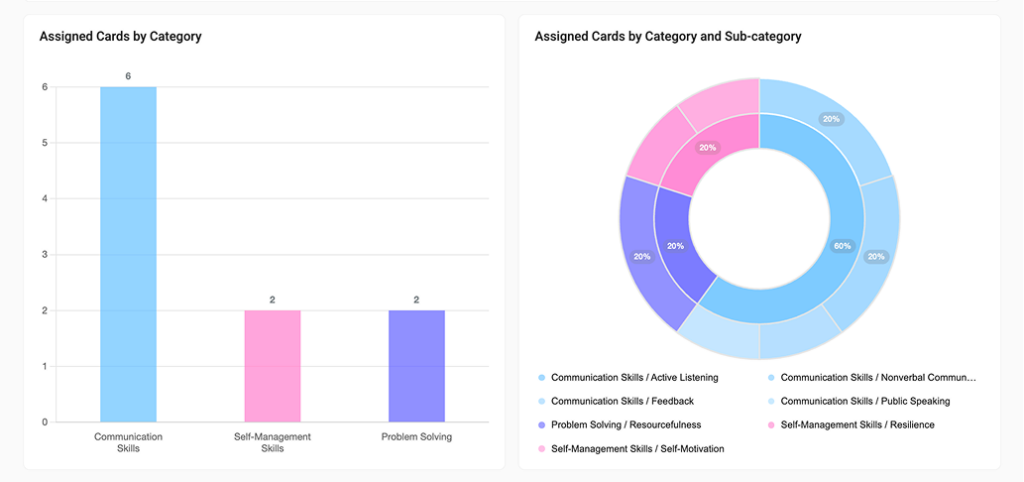
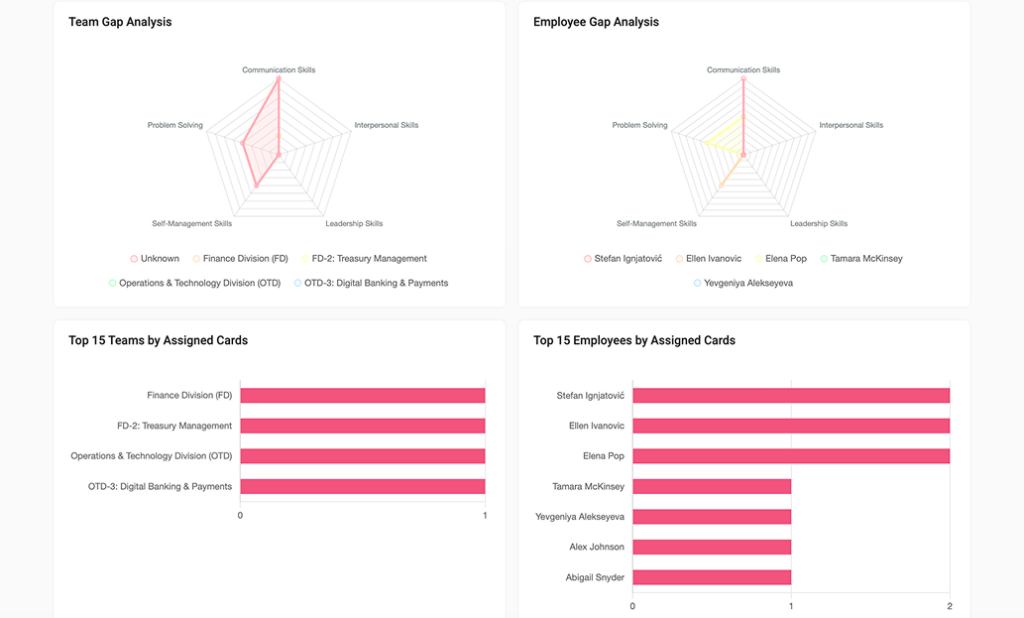
Kudos Analytics gives you a way to see which teams, employees, specific cards, card categories, or subcategories get exchanged the most. You can select a specific time period to spot trends and see if certain team activities impacted the exchange of Kudos Cards, and switch between Card View, Team View, Employee View, or Kudos Feed view to see details of each exchanged card.
Besides this, Kudos Analytics provides you with an overview of gaps by team or individual employees, so you can see which categories you need to work on with each.
Additionally, the Kudos Cards library got enriched with 100 new Kudos Cards.
Improvements
- Arabic language platform modifications
- Pinboard claim for Editor role – Portal users with the Editor role can post Pins and target them to specific employees or teams. This allows employees in charge of content creation to easily and quickly share posts with the entire company or only with selected groups, without seeing the results of individual teams or employees, thus fully preserving data privacy.
- Model upgrade for AI Analysis (from Claude Sonnet 4.5 to Claude Sonnet 5)
RELEASE: 18 JUN 2026
1) AI Impact Module
New module with a custom survey template, specific metrics, dimensions, and categories, and a dedicated AI Impact Report. Read more about it here.
Links to questions in Semiannual Report
Questions in the Summary view of the Semiannual Report are now clickable, leading to the exact Team Pulse wage of the week they were asked in within those 6 months.
Duplicating question in Custom Survey
Duplicating a question inserts it immediately below the original rather than at the bottom of the survey.
RELEASE: 26 MAY 2026
1) SAP HRIS Integration
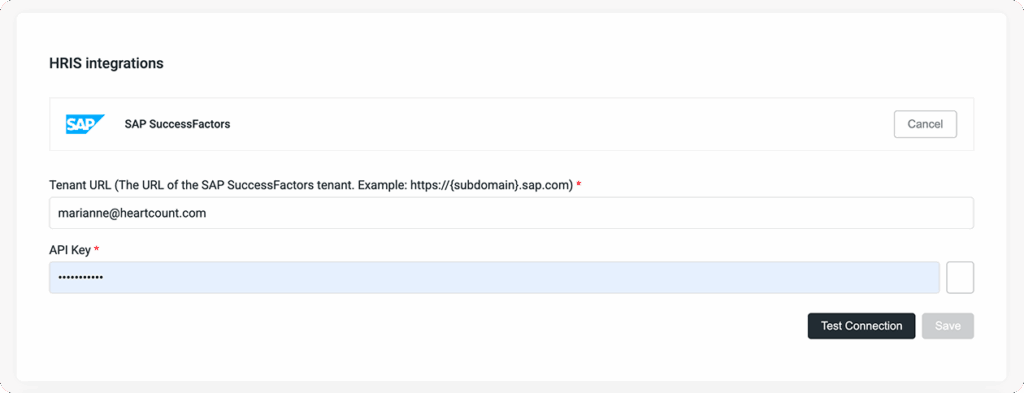
Import employees’ names, last names, email addresses, and team.
2) Pin notifications for employees
Employees can receive notifications for newly published pins via email, Slack, and SMS.
1) Custom Employee Engagement Survey Improvement
The survey now allows for multiple-choice and open questions to be included within.
2) Filters on the Questions page
More filters are available on the Questions page (added Dimension, Additional Metric, Engagement Index).
3) Semiannual Report improvements
On the pages Employee Metrics and Employee engagement in the tables, the employees’ contact information was added under their names. Also, in the export of those two pages, a column with the employees’ team information was added.
RELEASE: 12 MAY 2026
1) Kudos Cards
A new way for peer recognition. Employees can exchange Kudos Cards, while Admins and Managers can track and analyze the activity around Kudos Cards. Read more
2) Pinboard
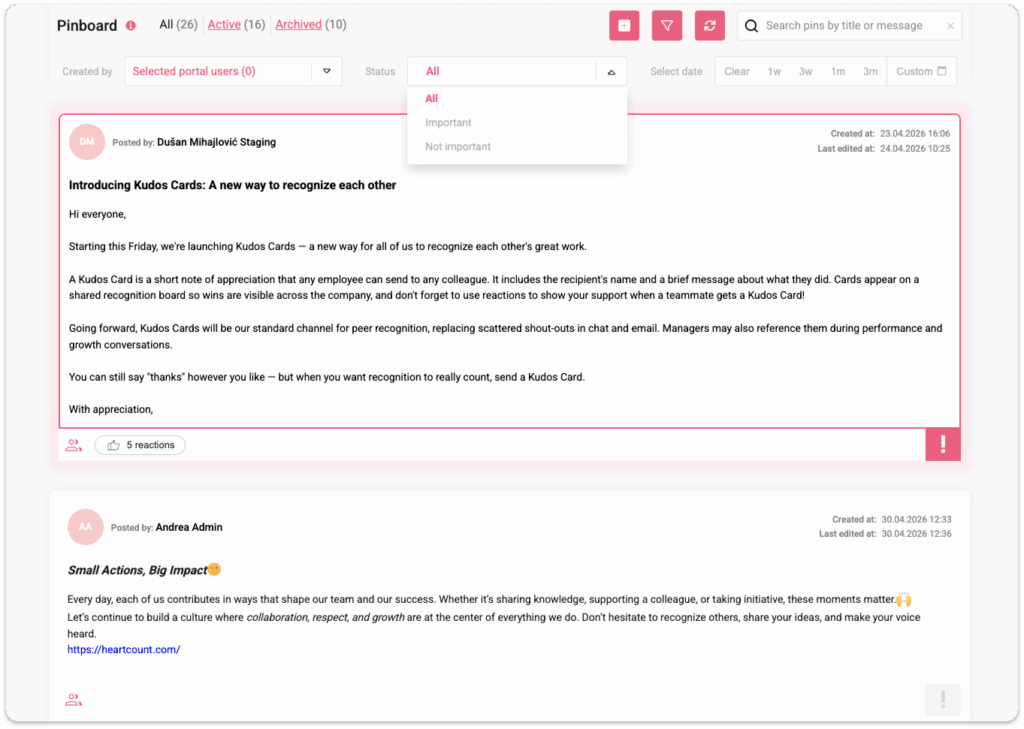
A dedicated place to share announcements, updates, and news. The audience can be customized. Read more
3) People page
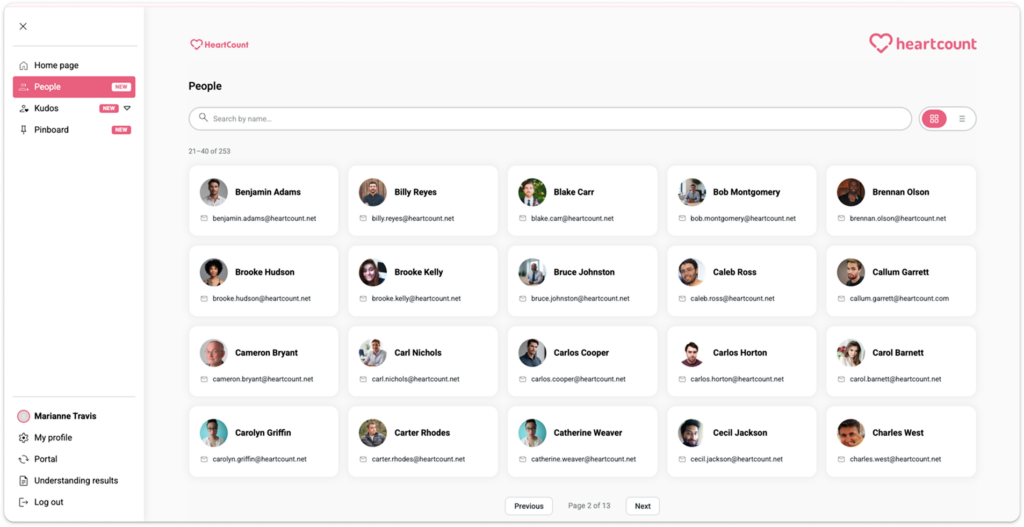
A consolidated view of all colleagues/employees in one place, with their name, profile photo & email address. Employees can access this information if the permissions for it are enabled in the Company settings.
RELEASE: 16 APR 2026
1) Microsoft Entra integration
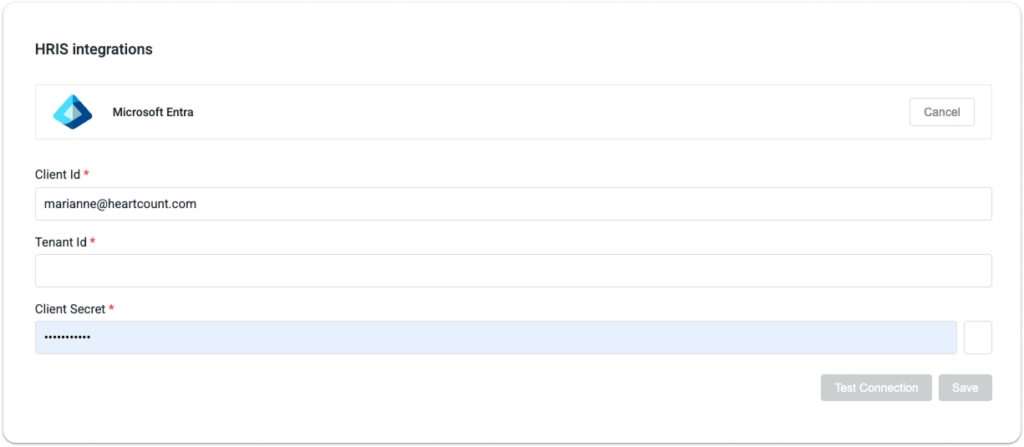
Integrate with Microsoft Entra to automatically import users, create teams, and allocate people to teams.
2) Personal settings page for Managers
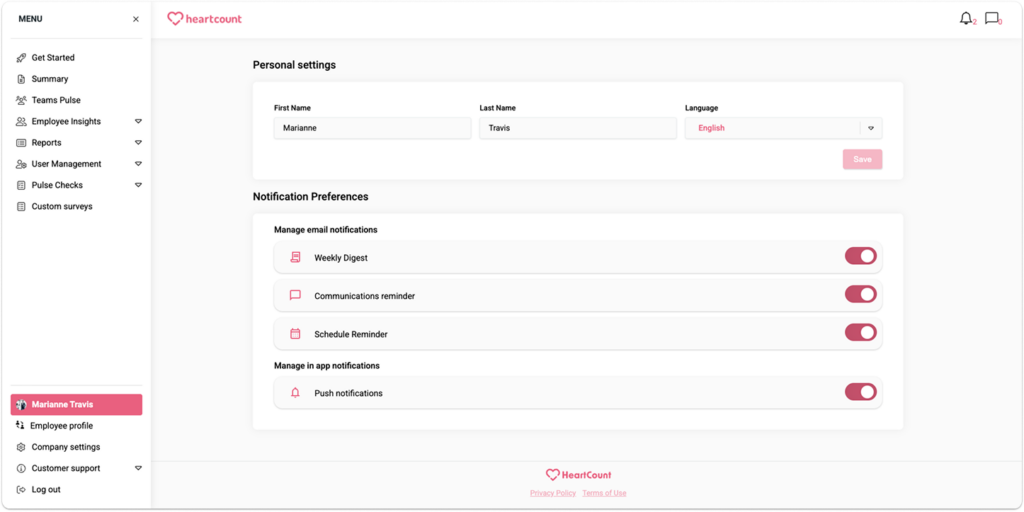
Managers have a personal settings section where they can change their name, language, and enable/disable subscriptions to emails and push notifications.
3) Arabic language
The HeartCount app is now available in the Arabic language. To be used, it needs to be set in Pulse Checks → Questions → Check “Arabic” box.
1) Employee Engagement Survey creation improvement
Now available to create without adding the template first; Answer values can now be numbers.
2) Employee UI
Added sidebar for easier navigation; One button for all active surveys (Pulse Checks, Custom Surveys).
RELEASE: 24 MAR 2026
Employee Engagement Survey
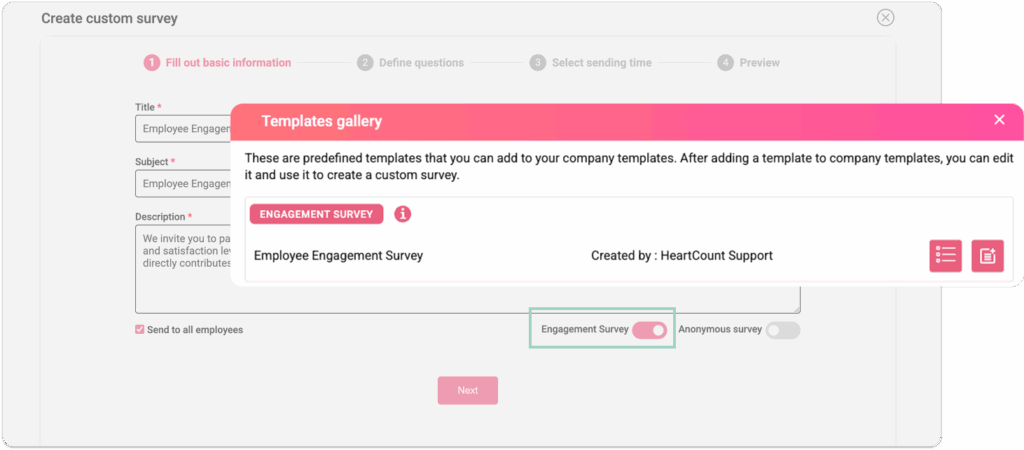
Measure key employee engagement metrics at your pace – monthly, annually, or a few times a year. Go to the Templates Gallery, add the template to your company’s templates, select languages in which you want to send it out, and adjust the questions if needed.
Once you start editing, make sure the Engagement Survey toggle stays on so you can get complete reports.
Employee Portal: Button for active Custom Surveys
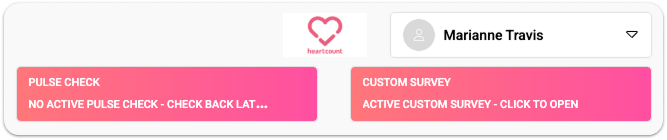
Employee Portal shows a button for their active custom surveys with expiration dates. The button will show only unanswered Custom Surveys or Custom Surveys with multiple answering options for employees to answer again.
RELEASE: 12 FEB 2026
Team Transfer & Merge
Moving the team will also move its subteams, with employees automatically transferred. Merging one team with another automatically transfers employees to the destination team, while keeping the information on the primary team’s deactivation date and joined date for the new team.
Custom Surveys on Employee profile
Employee profile now shows all Custom Surveys the employee received, including the title, send date, and whether and how they answered. Anonymous Custom Surveys will be displayed only with their titles, send date, and if employee answered it.
Custom Survey Gallery
Access pre-defined Custom Surveys (Engagement Survey, Exit Interview Survey), customize them, and save them as a template. The templates can be translated into every language (available in the app), and users choose which languages they want the templates saved in.
Praise response
Employees can respond to praises they’re mentioned in. All praise responses will be visible to Admins. Praise responses are not included in praise calculations.
The person who wrote the praise cannot answer their own praise.
Saved data for deleted Employees
Deleted Employees will not be visible across the platform with their full data, but their responses, comments, and praise will still be visible under the “Deleted Employee” name.
Export Portal Users
Portal users can now be exported with their role, last login time, teams they have access to, creation date, and contact information.
RELEASE: 20 JAN 2026
Praise pop-up after pulse check submission
Get portal notification when users unsubscribe from pulse surveys
Manually lock eNPS questions
Company settings: Employee's permission
Set permissions for employees to see participation statistics for the company and all teams, only the company, or the company and the teams they belong to.
Summary page: Response rate added to every week
AI insight page: Pop-up with explanations on title click
Fix for:
- Praise count not consistent on Summary page and Employee Overview page
- Bar chart for Results over time not showing all decimal places
- Sorting issue on Employee details page for Highly unfavorable employees
- Demo survey not loading on every instance
RELEASE: 02 DEC 2025
AI Insights
- Configuration in Company Settings – add employees who will be included in AI Insights analysis
- Export page data
- Sample data available
Admin automatically added as an Employee after completing registration
Fix for:
- Custom survey: error message when sending fails due to 0 recipients
- Fixed “Thank you message” after Pulse Check on Employee UI
- UI/UX fixes on the platform and Demo survey
RELEASE: 30 OCT 2025
Added option in the Company settings: Managers can see AI Analysis
Improved AI analysis recommendations
RELEASE: 07 OCT 2025
Team Overview export
Adjusted team names formatting for easier Power BI import (client request)
Various performance improvements
Fix for:
- Employee chart bug for one client
- Employee results filter fix (highly negative)
- URL redirection fixes (Employee highlights and Praise redirections)
RELEASE: 16 SEP 2025
Interactive Pulse Check
Set up an Interactive Pulse Check instead of a Standard Pulse Check in the Company settings.
Bulk employee deactivation
Added calculation for “I can’t answer this question”
Custom Survey: added expiration date
Import demographic data separately or through the import file
Fix for:
- An option to send Custom Surveys available to users who are not subscribed to Pulse Surveys
- Inconsistent Team name changes across the platform
- UI errors in Employee view
RELEASE: 20 JUN 2025
Free trial
Users can use all premium features with a free trial of 30 days.
AI Analysis
Get a summarised employee analysis, with churn risk prediction, and actionable recommendations.
Historic data trends with export option
Employees from deactivated Teams have their Leave date set to the team’s Deactivation Date
Employees who are deactivated or unsubscribed are removed from their teams
RELEASE: 06 MAY 2025
Teams Overview
- Deactivated teams with results in the observed period are shown on the page
- Available page export
Active survey button added on the Employee UI portal
Custom Survey mandatory fields
Custom Survey now includes mandatory fields: Title, Email Subject Line/SMS text, and Description. The Email Subject Line is limited to 90 characters, with a character counter displayed in the top-right corner for clarity.
Filters in the Communication module
Added filters in the Communication module – Teams dropdown, Created by, Replied by, Status, and Date picker.
Teams Overview page changes
Teams Overview page changes – included date picker, comparison dropdown, and additional metrics.
Data Export
Exporting Employee data includes notes.
Fix for:
- Not answered Custom Survey questions counted in the results
- Users able to submit Custom Surveys multiple times
RELEASE: 26 MAR 2025
“Add to Conversation” option in Communication module
Employees and Portal users are able to include participants in discussions. Employees can add only their direct Managers and Admins, while Portal users (Admins) can add any user. For anonymous employee messages, the button is hidden for Portal Users, while employees can add their direct Managers. A search bar is available for everyone to easily find specific people by name, email, or phone. This feature promotes collaboration while ensuring privacy and role-based control.
“Read by” indicator
“Read by” indicator is added to the Communication module to improve transparency and accountability. When hovering over the indicator, a list of participants who have read the thread or message is displayed. The status will show ‘Read by Some’ if only specific employees or portal users have read it, and ‘Read by All’ when all participants have viewed the message.
Push notifications for new messages and replies
Web push notifications were introduced to keep users informed in real time, even when they are not actively using the platform. These notifications appear directly in the browser and alert users about important updates such as new messages and replies – ensuring timely engagement and improved responsiveness.
Custom Survey Teams Data in Anonymous version
For companies using the anonymous version of the platform or sending anonymous Custom Surveys, the team name column was enabled in the Custom Survey results – both on the report page and in the Excel export. Additionally, a team dropdown filter was added to improve data navigation and segmentation.
Rules for disabled comment visibility
When comment visibility is disabled in the Company settings, Managers won’t receive notifications for comments.
Notes in Employee profile
Notes in Employee profile with their Authors and Dates included in the Employee export document in a single column (Employee details and User management —> Employee pages).
Fix for:
- Notes reminder not arriving at a scheduled time
RELEASE: 17 FEB 2025
Paycor Integration
Seamless sync employees and teams from Paycor to HeartCount
Mexican Spanish translation
We introduced Mexican Spanish as a new translation option to enhance localization and accessibility for Spanish-speaking users in Latin America. This update ensured a more natural and region-specific experience by aligning terminology, grammar, and vocabulary with Mexican Spanish conventions.
Communication module
Notification Email/SMS subject and body improvements. Enhanced the mobile responsiveness of the Communication module within the platform to ensure a seamless user experience across all devices for all Portal Users. This includes optimizing layouts, and ensuring key functionalities remain fully accessible on mobile screens.
Data Export Improvements
Employee export
RELEASE: 05 FEB 2025
Communication module notifications for Portal Users & Employees
Each workday at 9 AM local time, we send Portal Users and Employees a summary of the total number of unread new threads and replies received in the past 24 hours, or 72 hours on Mondays, since notifications are not sent over the weekend. If there has been no new activity, or if all new activity has been marked as read, replied to, or resolved within the last 24 hours, nothing will be sent. Additionally, the update only includes information about new activity from the past 24 hours and does not sum up with previous interactions reported the day before. The update, delivered via preferred channel (Email, SMS or Slack), provides a combined total of all interactions, including new pulse check comments, direct messages, and replies to existing threads, along with a link to the Communication module page.
Demographic data
Added Demographic data to the list of Employee Attributes
RELEASE: 30 JAN 2025
Restricted Manager role
Throughout the application, when using the restricted manager role and no team is selected, the component should display “My Teams” instead of the company name. Calculations will be adjusted as needed to ensure data is displayed exclusively for the teams assigned to the restricted manager.
RELEASE: 20 JAN 2025
Deactivated employees automatically removed from all teams
Deactivated employees are automatically removed from all teams, with their leave date recorded. If reactivated, they are assigned the status “Without team.” Previous team memberships are displayed in the “Inactive” tab of the employee’s profile. After reactivation, the Portal User must manually assign the employee to a team.
Editing deactivation reason for deactivated employees
An “Edit” button has been added to the Status tab of the Edit Employee dialog. Clicking it opens a Deactivation Reason dialog, enabling users to update the deactivation reason. Upon saving, only the deactivation reason is updated, while the original creation and deactivation dates remain unchanged, ensuring the initial deactivation date is preserved.
Comments with Survey date
Visible Survey date for comments in the Communication module.
RELEASE: 28 NOV 2024
Semiannual Report Improvement
Updated the Semiannual Report PDF export to replace the green separator with a grey one in the Intent to Leave and Dimensions sections for enhanced visual consistency.
Employee External ID in Import
Added an Employee External ID column to the import file, enabling the assignment of unique identifiers for seamless matching with the company’s HRIS system.
Deactivated Employees Filter
Added filtering options on the Employees page under User Management to include deactivated employees. Filters now support team, delivery channel, labels, and deactivation reasons, enabling more comprehensive data management.
Sorting for Portal Users
Added sorting functionality for Creation Date and Last Login Date on the Portal Users page, improving organization and navigation.
Team Export by Hierarchy
Updated the Team Export functionality to display teams based on their hierarchy rather than an alphabetical list, providing a more structured organization.
Status Tab for Employee Management
Introduced a Status tab on the Edit Employee page, alongside Teams and Information, allowing portal users to deactivate or delete employees. Deactivation now requires selecting a reason from the following options: Termination of Employment, Resignation, Extended Leave, Retirement, End of Contract, Unknown (default for previously deactivated employees), or Other.
Team Affiliation as Numbers
Updated the Employee Details and Employee Overview pages to display team affiliations as numbers, aligning with the behavior on the User Management / Employees page for improved UX.
Highlight skipped questions
Skipped questions in Semiannual Metrics (EE Index and Dimensions) and Semiannual Team Categories are now highlighted in dark blue for better
Custom Survey Report Visualization
- Admins can now access real-time custom survey data through a reporting feature available via a new icon on the custom survey card.
- The report includes a floating navigation bar with filters for Teams, Employees, and Labels (multi-select with search), an export button (Excel), and dynamic filtering logic for charts and tables.
- Excel exports include a detailed data table and a summary sheet for single/multi-choice questions.
- The report also features response rate metrics, an overview table, and question-specific visualizations (pie charts, column charts, and response tables). Open-ended responses include an employee response table and optional word cloud analysis.
- Fully compatible with all platform-supported languages, delivering an intuitive and actionable reporting experience.
Fix for:
Resolved an issue where the export file displayed “undefined” instead of the team name as the title in the Semiannual Report.
RELEASE: 24 OCT 2024
SMS Text Improvements
Optimized SMS messages for key languages, with improved UI tips across all supported languages.
Custom Surveys by Labels
Admins can now send targeted custom surveys using labels, enhancing precision in employee engagement efforts.
Zoho HRIS Integration
Integrated ZOHO HRIS for one client with automatic employee data sync, ensuring real-time accuracy in organizational records.
Employee Profile Chart
Survey data charts now start from an employee’s creation date for more accurate historical insights.
"Creation Date" Field
Implemented “Creation Date” field across employee records, improving data consistency for newly added and imported employees.
"Deactivation Date" Field
Added a sortable “Deactivation Date” field displaying the timestamp of when each employee was deactivated.
External Employee ID
Companies can assign an external employee ID to employees within the portal.
RELEASE: 03 OCT 2024
Manager Access to Employee Results
A company-wide setting now allows you to enable or disable managers’ access to individual employee results.
Manager Access to Comments
A company-wide setting now enables or disables managers’ access to employee comments.
"Other" Option in Custom Surveys
A new “Other” option has been added for both single and multiple-choice questions in custom surveys.
Custom Survey Reminder Information
The most recent reminder information is now displayed on the Custom Survey card.
Summary Page Date Display
The summary page now shows only the specific survey day (Friday) instead of the entire week when the date picker is set to “Survey.”
Custom Survey Improvement
New answer options can now be added by pressing Enter while creating a custom survey.
Transparent Messaging in Anonymous Version
The anonymous version now allows sending transparent messages to managers.
Activity Filters in Anonymous Version
All activity filters are now available in the anonymous version of the app.
Turkish Praise Translation
Improvements have been made to the Turkish translation of Praises based on native speaker feedback.
Employee Removal from Teams
Removing an employee from a parent team will now automatically remove them from all child teams.
Employee Team History
Employees can now be added to the same team multiple times, thanks to the new “Employee Team History” feature.
Auto-refresh after team editing
The page now automatically refreshes after team editing, keeping the user in the “Edit Team” dialog.
Fix for:
Weekend Praises: Fixed an issue where Praises written on Saturday and Sunday were not being displayed on the summary page.
RELEASE: 03 SEP 2024
Custom Survey Response Limit
Response limit in Custom Surveys increased to 30 options