

HeartCount Review: The Best Employee Engagement Platform for Teams That Want to Act Early







What if you could spot burnout, frustration, or disengagement while there is still time to fix it? That is the problem HeartCount is built to solve. Instead of relying on delayed annual surveys or gut feeling, it gives you regular, lightweight signals from your teams and turns them into something you can act on.
There are plenty of employee engagement platforms that promise surveys, analytics, and a better culture. But once you actually use them, many either overwhelm you with complexity or leave you with data that does not tell you what to do next.
HeartCount takes a different approach. It focuses on continuous feedback and clear signals that help you respond early, while problems are still manageable.
I put together this HeartCount review to walk you through the platform step by step. Not from a sales angle, but from real use. What it does well, where it fits, where it falls short, and when it makes sense to choose it over alternatives.
HeartCount at Glance

HeartCount is an employee engagement platform that helps you understand how people actually feel at work, while there is still time to do something about it.
Instead of waiting for a long annual survey, HeartCount uses short pulse surveys and ongoing feedback to track engagement, recognition, and employee experience in real time. It feels more like a conversation than a formal HR process.
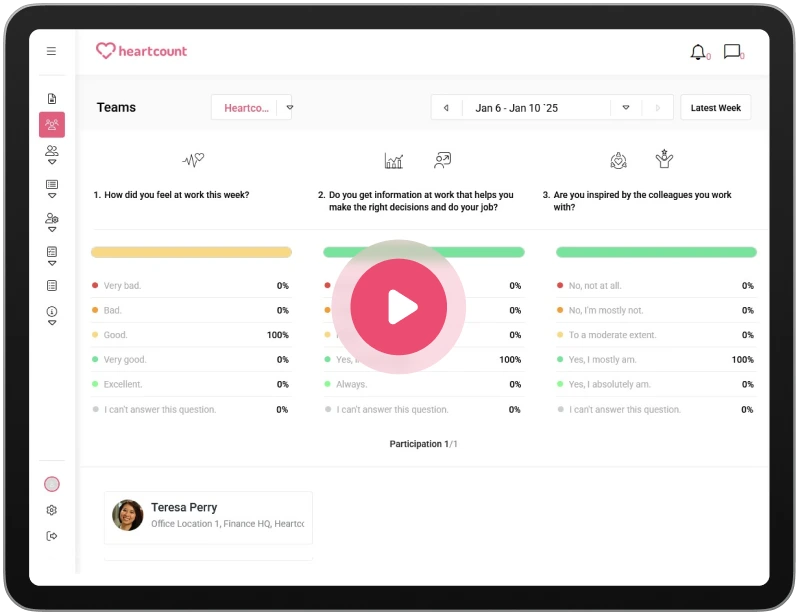
What stood out to me right away is how simple it is. Every week, employees answer a few quick questions. These surveys take seconds, not minutes, but they still generate meaningful data.
Behind the scenes, HeartCount turns those responses into analytics that show trends, risks, and changes in employee engagement scores. I did not have to dig through spreadsheets. The platform highlights what matters and points me toward actionable insight.
HeartCount is clearly built for HR professionals and HR leaders who want clarity without complexity. It combines engagement surveys, employee feedback, recognition, and analytics. I could see how different teams were doing, how the company culture was shifting, and where performance issues might appear next. It does not try to be a full performance management system. Instead, it focuses on everyday signals that affect people, teams, and results.
What I recommend HeartCount for most is turning feedback into action. The platform does not just collect data. It connects surveys, feedback, and recognition into a clear view of how organizations function day to day.
If you care about culture, employee engagement, and making better decisions with real data, HeartCount does that job well without overcomplicating things.
HeartCount Pros
After using HeartCount in real-world situations, these strengths stood out the most. The platform focuses on clarity, speed, and practical value rather than complex HR processes.
- Easy employee engagement
The weekly pulse surveys are short and predictable, which makes employees more willing to participate. Because the surveys take very little time, engagement stays consistent instead of dropping off like it often does with longer surveys. - Actionable analytics, not just data
HeartCount does not overwhelm you with raw data. The analytics highlight patterns, changes, and risks, so you can quickly understand what is happening and turn it into action. This makes the insights practical, not academic. - Strong focus on employee feedback
Feedback is collected in multiple ways, not only through surveys. Employees can leave comments or send messages, including anonymously. This creates a safer space for honest input and improves trust. - Built-in recognition that supports culture
Peer recognition is part of everyday use, not a separate program. Public praise helps reinforce positive behavior and strengthens company culture without feeling forced or artificial. - Clear view across teams and organizations
HeartCount makes it easy to compare teams and spot differences early. I could see which teams were improving, which were struggling, and where performance issues might develop if ignored. - Good fit for HR professionals and HR leaders
The platform supports HR decision-making without adding complexity. It gives HR professionals and HR leaders the insight they need while keeping the workload manageable. - Free plan for small teams
The free plan allows smaller organizations to use real features, not a stripped-down demo. This makes it easier to evaluate the tool in real conditions before scaling. - Clean and simple user experience
Both employees and managers can use the platform without training. The user experience is straightforward, which reduces resistance and increases long-term adoption.
HeartCount Cons
After using HeartCount, there are a few limitations worth knowing about. None of them are deal-breakers, but they may matter depending on what you expect from the platform.
- Not a full performance management tool
HeartCount focuses on engagement, feedback, and culture. If you are looking for deep performance management features like goal tracking or formal reviews, you will need another tool alongside it. - Best value comes with regular use
The platform works best when surveys, feedback, and recognition are used consistently. If a company treats it as a “set and forget” tool, the insights and analytics lose some value. - Limited customization in structure, not content
While surveys are flexible, the overall flow and structure of the platform are quite opinionated. This is usually a benefit, but organizations that want highly customized workflows may find it slightly limiting.
HeartCount Key Features
Let’s take a closer look at the main product features:
Pulse Surveys
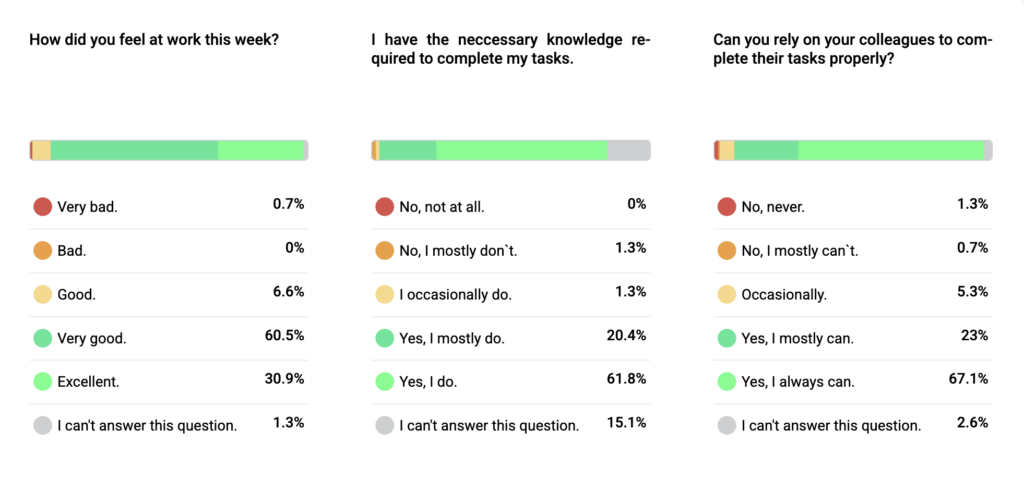
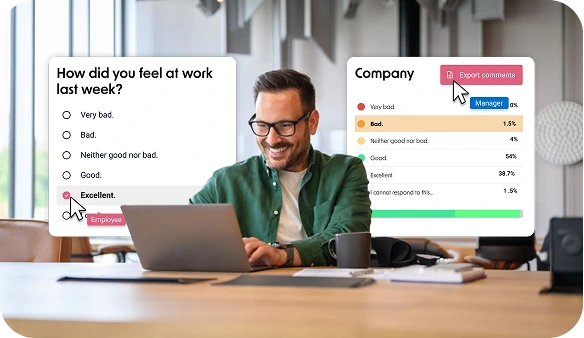
Pulse surveys, the core of HeartCount, are short weekly surveys with just three questions.
Employees receive the same first question, related to well-being, every week, which helps track trends over time. The other questions rotate and cover engagement, performance, culture, and how people feel at work. Because the surveys are short, people actually complete them instead of ignoring them.
What matters here is consistency. Instead of relying on a big annual survey that people forget about, HeartCount collects small pieces of feedback regularly. Over time, these answers create reliable data. You can see changes in employee engagement scores, spot drops in morale, and understand how teams are doing week by week.
From my experience, pulse surveys are effective because they feel light for employees but powerful for organizations. They are easy to answer, easy to manage, and they create the foundation for all the analytics and insights HeartCount provides.
Employee Engagement Surveys
Employee engagement surveys build on pulse surveys, but they look at engagement in a more structured way over time. Instead of asking random questions, HeartCount uses a consistent framework to measure how engaged people are at work.
Questions are grouped into clear categories:
- Wellbeing
- Personal advancement
- Feedback & recognition
- Relationship with colleagues
- Relationship with management
- Attitude towards the company
- Productivity and efficiency
- Job satisfaction
Employee engagement dimensions or core drivers include:
- Motivation,
- Autonomy,
- Emotional exhaustion
This makes it easier to understand what kind of engagement is changing, not just whether it goes up or down. For example, a team can feel motivated but still be emotionally exhausted, and HeartCount separates those signals instead of mixing them.
The system calculates employee engagement scores automatically based on survey responses. I did not need to design formulas or benchmarks. The platform shows trends over time and compares teams inside the same organization. This helps HR professionals and managers see where engagement is strong and where it is slipping.
Custom Surveys
Custom surveys let you ask questions outside the weekly pulse surveys. I recommend using them when you need feedback on a specific topic, not general engagement.
With this feature, you can create surveys with your own questions. Choose different question types, decide who receives the survey, and control whether answers are anonymous or not. This makes it useful for onboarding feedback, internal changes, team check-ins, or testing how people feel about a new policy.
This feature is also useful for stay and exit interviews. Instead of running these as one-off processes in separate tools or documents, you can handle them directly through custom surveys. That way, feedback from people who stay and people who leave still connects back to engagement data, trends, and team context.
What I liked is that customizable surveys do not disrupt the flow of the platform. They use the same logic as pulse surveys, so results still show up in the same analytics environment. You do not end up with isolated data that is hard to compare or use.
Employee Feedback and Comments
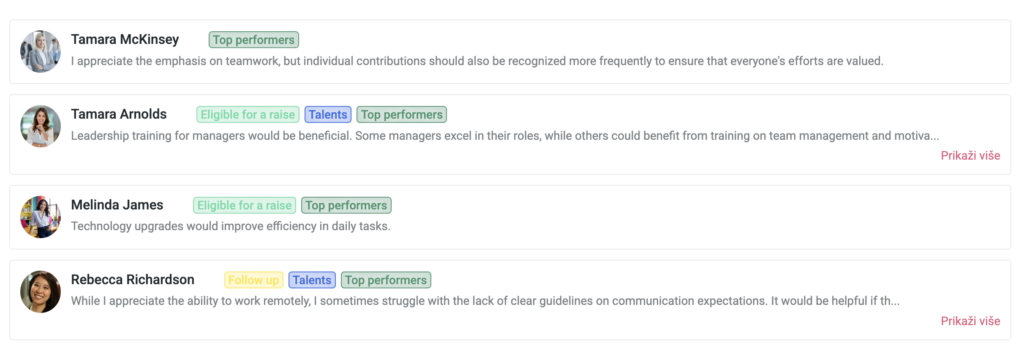
Employees can add comments to their survey answers. This turns simple numbers into real employee feedback. If something feels off, people can explain why in their own words. That makes the surveys more human and more useful.
For example, a score might drop slightly, but a comment explains why. It could be workload, communication, a manager issue, or something positive that numbers alone would never show. This makes the data easier to understand and act on.
Comments can be anonymous or transparent, depending on how the company sets up pulse surveys. This is defined at the company level, not by individual employees.
By default, feedback is transparent, with visibility into individual responses. Companies can switch to anonymous surveys if they prefer, as long as expectations are clearly communicated.
What I appreciated is that feedback does not disappear into a void. Managers and HR can respond through the platform, which creates a feedback loop instead of a one-way data dump. From my experience, this makes employees more likely to keep sharing because they see that someone is listening and responding.
Anonymous Feedback Options
Anonymous feedback in HeartCount depends on how pulse surveys are configured at the company level. Anonymity is not chosen per employee, but set for the entire organization.
When anonymous surveys are enabled, employee identities are hidden while feedback still reaches HR and managers. This helps reduce hesitation around sensitive topics. Communication can still continue through the platform, even without revealing who submitted the feedback, which keeps the dialogue open while protecting employees.
Employee Recognition
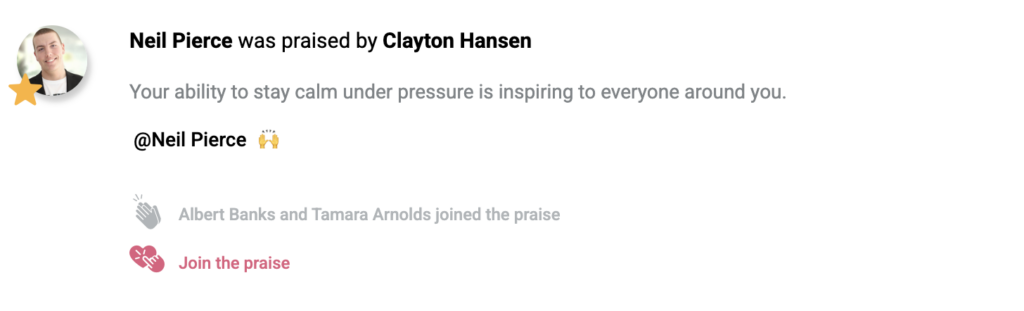
Employees can give peer praise at any time, not only during surveys. These recognitions are visible across the organization, which helps positive behavior stand out. When someone does good work, it is acknowledged publicly rather than lost in private messages.
What makes this feature effective is its connection to engagement. Recognition shows up alongside survey data and feedback, so you can see how appreciation relates to motivation, morale, and performance. It is not just about saying thank you. It becomes part of the engagement picture.
Team Pulse
Team pulse (sometimes referred to as a team happiness index) is a simple way to understand how people feel at work overall. It is calculated from ongoing pulse surveys and reflects emotional well-being over time.
Instead of guessing mood or relying on gut feeling, I can see whether happiness was stable, improving, or declining across teams and the whole organization. This helps remove assumptions and replace them with data.
The team pulse works best as a directional signal. It does not explain everything on its own, but when combined with engagement scores, feedback, and comments, it gives strong context. From my experience, it is especially useful for spotting early burnout risks and understanding the emotional side of company culture.
Communication Module
The communication module closes the loop between employees and the organization.
Employees can send messages directly to HR or managers through the platform. These messages can be transparent or anonymous, depending on the person’s comfort level. What matters is that the message does not disappear. It shows up in one place, connected to the rest of the engagement data.
When I used this module, I could see comments from surveys, direct messages, and replies in a single thread. Managers and HR can respond within the platform, so communication stays structured and traceable instead of scattered across emails or chats.
From my experience, this module improves trust. Employees see that feedback leads to responses, not silence. For organizations, it creates a clear, manageable way to handle ongoing feedback without losing context or accountability.
Actionable Analytics and AI Insights
HeartCount uses AI insights to continuously analyze pulse surveys, employee feedback, and engagement data across time.
What does this mean in practice? The platform automatically detects patterns in key engagement dimensions like well-being, motivation, autonomy, emotional exhaustion, and overall engagement. It highlights meaningful changes and potential risks, such as declining employee engagement scores or early signs of intent to leave.
The AI insights connect survey results, comments, and trends into a clear picture. HeartCount explains what is changing, where it is happening, and why it matters. This is what turns analytics into actionable insight, not just reporting. I did not need to manually compare teams or time periods. The platform did that work for me.
HR-Ready Reports and Data Exports
HeartCount offers several types of reports, each serving a clear purpose. I used different ones depending on whether I needed a quick overview or a long-term picture.
- Real-time reports: Always available and automatically updated. These weekly snapshots show current engagement, team dynamics, and early signals based on ongoing pulse surveys and feedback.
- Monthly reports: Focused on employee engagement and participation at the team level. Useful for tracking trends and changes from month to month.
- Semi-annual report: A six-month summary of employee engagement. Includes well-being, engagement, employee feedback, the Employee Engagement Index, eNPS, and the key dimensions of Motivation, Autonomy, and Emotional Exhaustion. The “results over time” section allows comparison with previous periods.
- Custom reports: Flexible reports that let you choose specific teams, timeframes, and focus areas. Designed to surface the data that matters most to your organization.
For sharing and deeper analysis, data exports are seamless. You can generate CSV files for a selected date range with detailed employee data, which is useful for analysis or record-keeping. Annual and semi-annual reports can also be exported in PDF format, making them easy to share with leadership or use in presentations.
From my experience, this reporting setup makes it easy to move between real-time insight and structured reporting without extra effort.
HeartCount Pricing
HeartCount pricing is straightforward and easy to understand.
You can start with the free plan, and yes, it is actually free. Use it with up to 25 people, and you still get unlimited pulse surveys, custom surveys, recognition, AI insights, engagement metrics, eNPS, and risk signals. For a small team or a startup, this is enough to understand engagement, culture, and performance without spending a dollar.
Once a team grows, HeartCount moves into the Business plan. This one costs $2.5 per employee per month, and it covers teams of up to 500 employees. You get deeper analytics, better reporting, full historical data, multiple languages, stronger security, and Single Sign-On.
For large organizations, there is the Enterprise plan, with custom pricing. You get a dedicated Customer Success Manager, help with implementation, custom integrations, and the ability to tailor the platform to how the organization already works. This is clearly meant for complex setups where structure, training, and reliability matter more than price alone.
One thing I appreciate is the billing choice. You can pay monthly or annually, and if you go annual, you save 20%. There is no pressure. You can start free, test the platform properly, and upgrade only when it makes sense.
HeartCount Integrations
HeartCount connects with identity and access systems like Single Sign-On. For example, if your organization uses Okta or Active Directory, you can use those systems to manage who logs in and how. I found this helpful because it means employees don’t have to remember another username and password, and HR doesn’t have to manage separate accounts.
It also integrates with HRIS systems, which can sync employee profiles and org structure into HeartCount. HR doesn’t have to manually add every employee or update information when someone changes teams. The integration keeps data flowing, so engagement surveys and analytics are linked to real organizational units and roles.
HeartCount also works with communication channels like Slack, email, and SMS for survey delivery and alerts. This matters because employees are more likely to respond when the survey comes where they already spend time.
For larger organizations, the Enterprise plan even offers custom integrations. This could mean linking HeartCount to other internal tools or dashboards.
HeartCount User Reviews
On Capterra, HeartCount holds a 4.9-star rating, and most reviews come from HR managers, team leads, and people responsible for culture and employee experience.
Many reviewers describe it as a tool they rely on weekly, not something they open once a quarter. One HR Manager in marketing and advertising called it “a must-have tool for organizations that want to keep their key people” and explained how the platform helped them spot risks early and act before burnout or disengagement turned into resignations.
A theme that comes up often is early risk detection. Multiple reviewers mention that HeartCount helped them identify people at risk of leaving and that AI-driven insights led to concrete actions. One team reported a 30% increase in retention after acting on recommendations surfaced by the platform. Others highlight how anonymous feedback made it easier for employees to speak honestly, especially during heavy workloads or intense project cycles.
Ease of use is another consistent point. Reviews repeatedly give 5 out of 5 for ease of use, features, and customer support. Team leads say employees adopt it quickly, and HR does not need to push participation. One common wish mentioned in reviews is a dedicated mobile app, but even those reviewers still rate the platform very highly and recommend it.
On G2, HeartCount has a rating of 4.6 stars. Reviewers describe it as simple, effective, and especially strong in engagement surveys, feedback, and culture tracking rather than full HR administration.
HeartCount Alternatives
HeartCount shines at engagement surveys, actionable insight, and team feedback, but depending on what you need (for example, deeper performance management, stronger HRIS integrations, or a more complete people platform), some HeartCount alternatives might fit you better.
The main HeartCount alternatives I’ve researched include:
- Lattice
- Leapsome
- Culture Amp
- 15Five
- Officevibe
- Workday Peakon
- Qualtrics
- Reflektive
Each of these HeartCount alternatives brings something different to the table, depending on what your organization needs most:
- Structured performance reviews and appraisal cycles: 15Five, Culture Amp
- Deeper analytics and benchmarking: Culture Amp, Peakon, Qualtrics
- Goal setting and OKRs tied to performance: 15Five, Lattice
HeartCount remains the top choice for pulse surveys, employee feedback, recognition, engagement scores, and actionable analytics, but if your organization also wants performance management + engagement + HR operations in one place, one of the alternatives above might fit better.
How To Start with HeartCount?
1. Sign up and pick a plan
First, you create an account and choose a plan. You can start with the free plan if you have a smaller team (up to 25 people). I recommend starting here because you get full access to core features without paying. If your team is larger or you want deeper analytics, you can move to the Business or Enterprise plan later.
2. Add your team or connect HR data
Once you’re in, the first real setup step is adding your employees. You can do this manually, or, and this is easier, connect your existing HR system (HRIS) like Workday, BambooHR, or others that HeartCount integrates with. That way org structure, teams, and roles sync automatically. I did this and saved myself a lot of admin time.
3. Configure your pulse surveys
HeartCount will start with weekly pulse surveys out of the box. You can keep the standard setup and send them right away, or tweak the survey questions if you want. I left most defaults because they are already structured to capture reliable engagement, performance, and culture signals without overwhelming employees.
4. Set delivery channels
Decide where surveys and notifications go (email, Slack, or SMS) and make sure people know what to expect. In my experience, delivery through familiar tools boosts participation right away.
5. Introduce HeartCount to your team
Before surveys go live, send a quick message to your team explaining what HeartCount is, why you’re using it, and how frequently surveys will come. I found that a short intro significantly improved early participation and reduced questions later.
6. Watch engagement and feedback roll in
After the first pulse survey, data starts flowing automatically. HeartCount’s dashboards show real-time reports that update as people answer. You don’t need to wait for a monthly or semi-annual summary to start seeing trends.
7. Explore analytics and AI insights
Once you have a few survey cycles, dive into the analytics. You’ll see engagement scores, performance signals, and recommended focus areas. I started with team-level views to spot patterns and then moved to company-wide reports for leadership conversations.
8. Use reports and take action
HeartCount generates real-time, monthly, and semi-annual reports, plus custom report options. I downloaded PDF summaries to share with leaders and used CSV exports for deeper analysis. These reports helped me turn feedback into practical next steps.
9. Loop back with feedback and recognition
Don’t stop at surveys. Use the communication module and peer recognition features to respond to feedback and celebrate wins. That reinforces culture and makes surveys more meaningful.
10. Repeat and improve
Because pulse surveys are weekly, you get regular signals. I checked HeartCount weekly, made small changes, and tracked how engagement and performance metrics responded over time.
Try HeartCount Today and Start Seeing Real Engagement Signals
If you want a tool that helps you catch issues early, understand your people better, and act with confidence, try HeartCount.
You can start with the free plan, set up surveys in minutes, and begin seeing real engagement scores and employee feedback within your first week. No heavy setup, no long waits, no guessing.
HeartCount allows you to:
- Get weekly pulse surveys running right away
- See actionable insight instead of raw numbers
- Understand team health before problems escalate
- Turn feedback into a better culture and retention
Start HeartCount today and make employee engagement a clear, simple, and continuous part of how your team works.